Running ZAP Against Juice Shop - Here Is What It Found
It has been a while since I posted something. I have been pretty busy with my day to day. I am re working my lab and some other projects. I was thinking on what to post about and since in my last post I deployed a small application security lab on Kubernetes. I thought it would be cool to run one of the tools I had deployed. I chose OWASP ZAP. ZAP is a DAST tool which means it tests the application while it is actually running. Think of it as a robot that pokes at your app from the outside looking for weaknesses.
I wanted to see what ZAP would find if I pointed it at OWASP Juice Shop. Juice Shop is an intentionally vulnerable application, so it is a good target to test our tool against.
This post will cover what ZAP found, what those findings actually mean, and what ZAP missed. That last part is important.
Documentations I used for this:
- https://www.zaproxy.org/docs/
- https://owasp.org/www-project-juice-shop/
- https://juice-shop.github.io/
- https://developer.mozilla.org/en-US/docs/Web/HTTP/CSP
- https://developer.mozilla.org/en-US/docs/Web/HTTP/CORS
The Pipeline#
I already have a ZAP pipeline in Jenkins from my previous post. All I needed to do was make sure Juice Shop was running and trigger the build.
For those that missed the last post here is the pipeline I am using:
pipeline {
    agent {
        kubernetes {
            yaml '''
apiVersion: v1
kind: Pod
spec:
  containers:
  - name: zap
    image: ghcr.io/zaproxy/zaproxy:stable
    command:
    - sleep
    args:
    - 99d
'''
        }
    }
    stages {
        stage('DAST Scan') {
            steps {
                container('zap') {
                    sh '/zap/zap-baseline.py -t http://juiceshop:3000 -r zap-report.html || true'
                    sh 'cp /zap/wrk/zap-report.html . || true'
                }
                archiveArtifacts artifacts: 'zap-report.html', allowEmptyArchive: true
            }
        }
    }
}
I brought ZAP up as a pod within Kubernetes, scanned Juice Shop, and produced a report. Total of 123 URLs scanned.
What ZAP Found#
Here is the summary from the report:
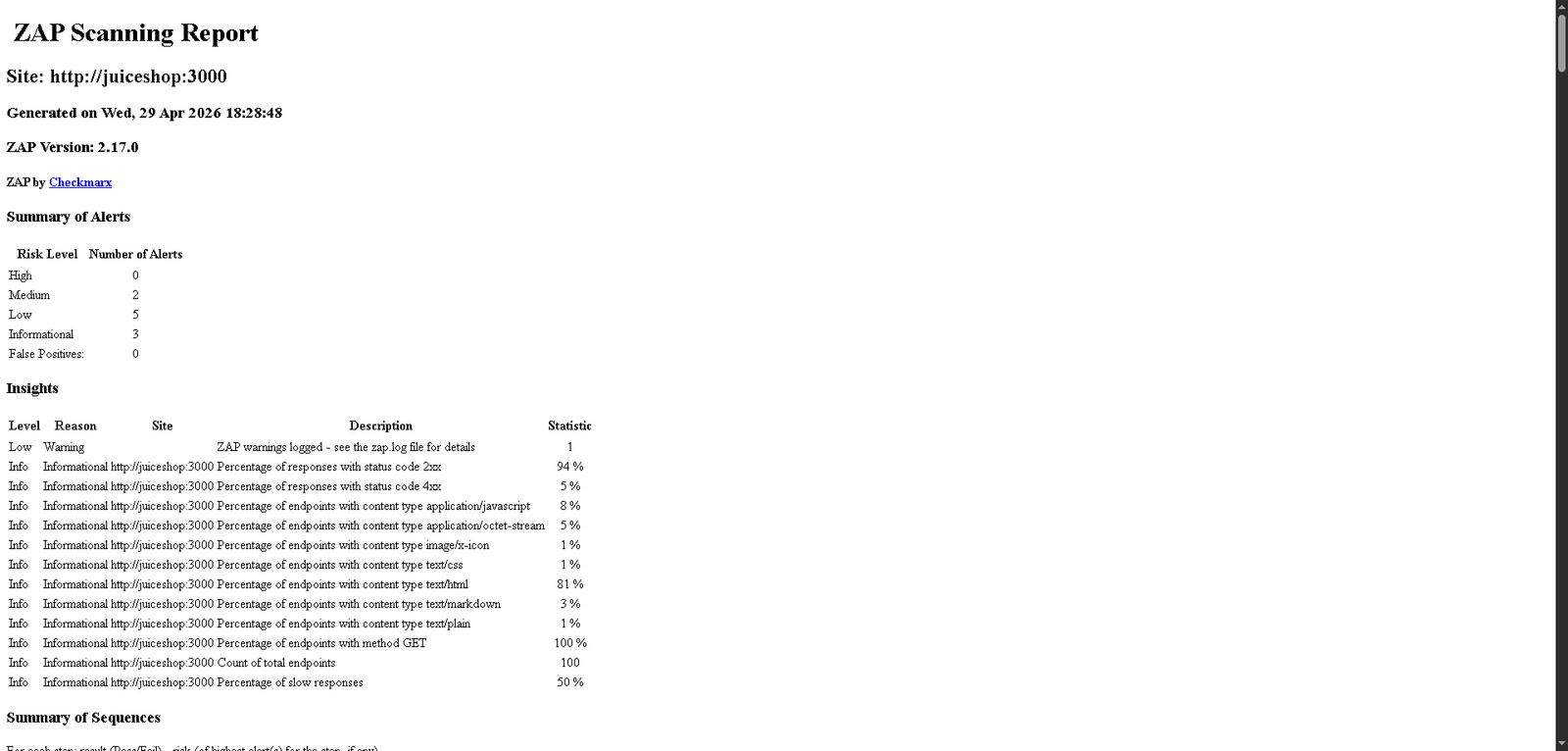
- High: 0
- Medium: 2
- Low: 5
- Informational: 3
- False Positives: 0
Not bad for a baseline scan. Let me go through the ones worth talking about.
Medium - Content Security Policy (CSP) Header Not Set#
ZAP flagged 5 pages for missing the CSP header including the main page and the sitemap.
CSP is a browser security feature. When a server sends a CSP header it tells the browser which sources of content are allowed to load. Without it the browser will load anything, which makes Cross-Site Scripting (XSS) attacks a lot easier to pull off. An attacker can inject malicious scripts and the browser will happily run them.
For Juice Shop this is intentional since it is a training app. In a real application you would want to set this.
Medium - Cross-Domain Misconfiguration#
ZAP detected that CORS (Cross-Origin Resource Sharing) is configured too permissively. It found this on the main page, the favicon, JS files, robots.txt and the sitemap.
CORS controls which external domains are allowed to make requests to your application. When it is too open, a malicious website can make requests to your app on behalf of a logged-in user and read the responses. This is a big deal for APIs that handle sensitive data.
Low - Storable and Cacheable Content#
Some responses that probably should not be cached are being cached. ZAP found this on robots.txt, the favicon, and several JS chunk files.
Caching is not inherently bad. The risk here is when sensitive pages or authenticated responses get cached by a proxy or shared browser cache. Someone else using the same machine could potentially pull that data from cache.
Low - Deprecated Feature Policy Header#
The application is sending a Feature-Policy header which has been replaced by Permissions-Policy. ZAP found this on 5 pages.
This is mostly a housekeeping finding. The old header still works in most browsers but it is considered deprecated. Worth fixing but not urgent.
Low - Timestamp Disclosure#
ZAP found Unix timestamps being leaked in responses on the main page and sitemap.
On its own this is low risk. The concern is that timestamps can help an attacker fingerprint the server, understand when things were last updated, or correlate activity. It is more useful as part of a larger attack than on its own.
Low - Dangerous JS Functions#
ZAP found risky JavaScript functions in two files: chunk-LHKS7QUN.js and main.js.
This flag typically means ZAP detected the use of functions like eval() or document.write(). These can be exploited if an attacker can control the input to those functions. Again for Juice Shop this is by design.
Low - Cross-Origin-Embedder-Policy Header Missing#
This header controls whether the page can be embedded in a cross-origin context. ZAP flagged 10 instances.
Missing this header can expose the application to certain side-channel attacks. It is related to browser isolation features. Most applications do not have this configured and it is relatively new.
What ZAP Missed#
This is the part I find interesting. Juice Shop has a lot of known vulnerabilities. SQL injection, broken authentication, insecure direct object references, exposed admin endpoints. ZAP did not find most of them.
Why? Because ZAP ran a baseline scan. The baseline scan is passive, it does not actively attack the application. It just observes traffic and looks for obvious header and configuration issues.
ZAP has a full active scan mode that would find a lot more. The tradeoff is it is slower and more aggressive. It actually sends attack payloads to the application. I will cover that in a future post.
The other thing ZAP cannot find is business logic vulnerabilities. Things like being able to place a negative quantity order to get a refund, or accessing another user’s basket by changing an ID in the request. Those require a human to test or at least a much smarter scanner.
This is why DAST is one layer of a security program, not the whole thing. It works best alongside SAST, SCA, and manual testing.
What Is Next#
Now that I have findings I think I would like to send them somewhere useful. In my lab I have DefectDojo deployed which is a vulnerability management tool. The idea is to have Jenkins automatically push the ZAP report to DefectDojo after every scan so I have a central place to track findings over time.
I will cover that integration in a future post. I hope you enjoyed this and found it as entertaining as I did when building this.